
Annual Report
Docs + Word6 pages
Free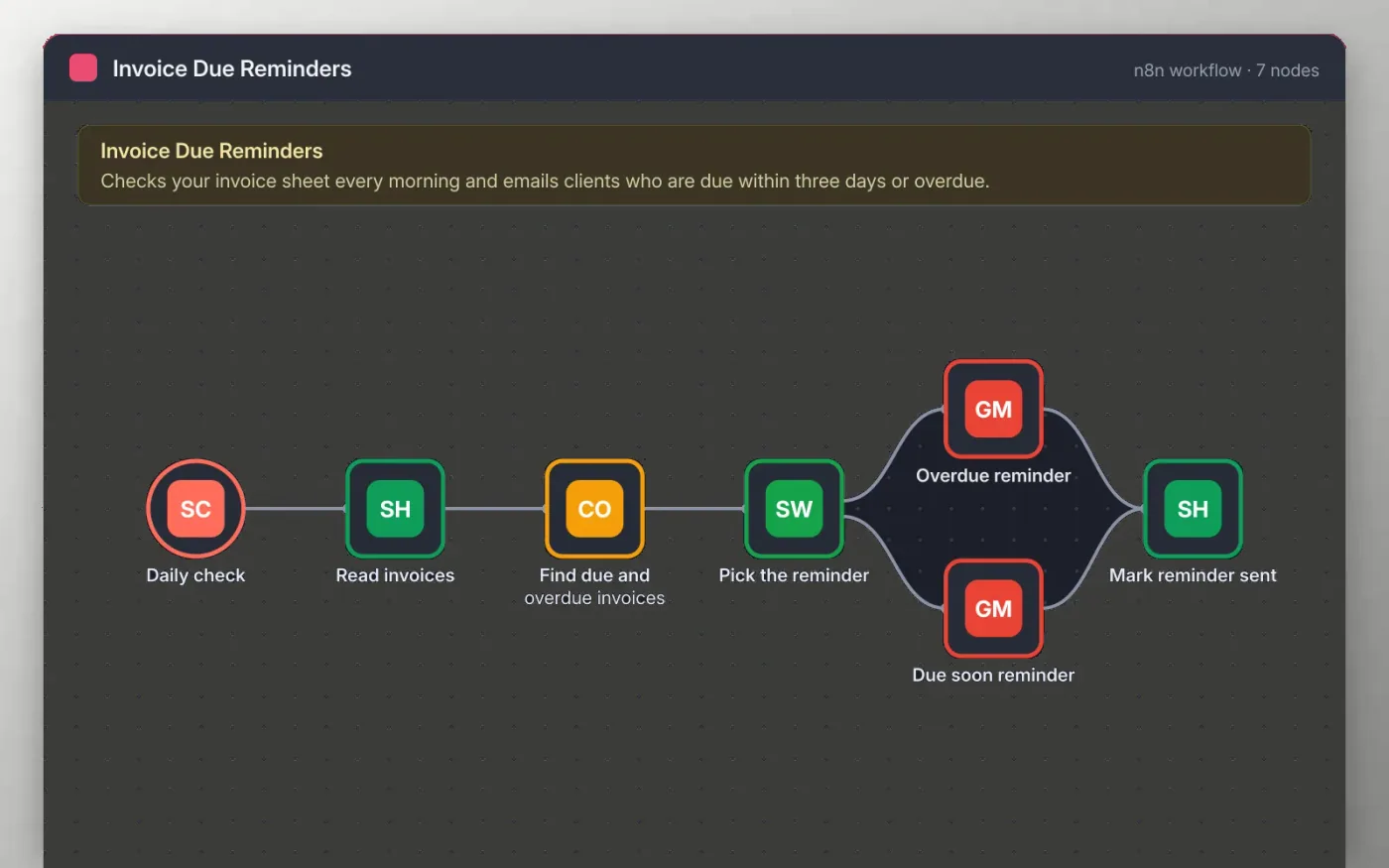
This workflow checks your invoice list in Google Sheets every morning. It works out how many days are left on each unpaid invoice and keeps the ones due within three days or already overdue.
Each client gets a short reminder from your Gmail account, worded for whether the invoice is coming up or late. The sheet is then updated with the date, so the same invoice is not reminded twice. Nothing is sent until you connect your own accounts and change the sender text.
Download the workflow JSON.
In n8n, create a workflow, open the menu, choose Import from File and select the JSON.
Connect Google Sheets on Read invoices and Mark reminder sent, and Gmail on the two reminder nodes.
Run the workflow once with a test invoice that uses your own email address.
Activate the workflow so the daily check runs at 9am.
Yes. Download the JSON and import it into your own n8n. There is no sign-up and no cost for the template.
No. The file has no keys or tokens. You connect your own Google and Gmail accounts after importing.
Yes. Rename the columns in the Find due and overdue invoices node and the Mark reminder sent node to match your sheet.
Docs + Word6 pages
Free
Excel
Free
Sheets + Excel4 slides
Free
n8n
Free
n8n
Free
n8n
Free
n8n
Free
n8n
Free







