
Annual Report
Docs + Word6 pages
Free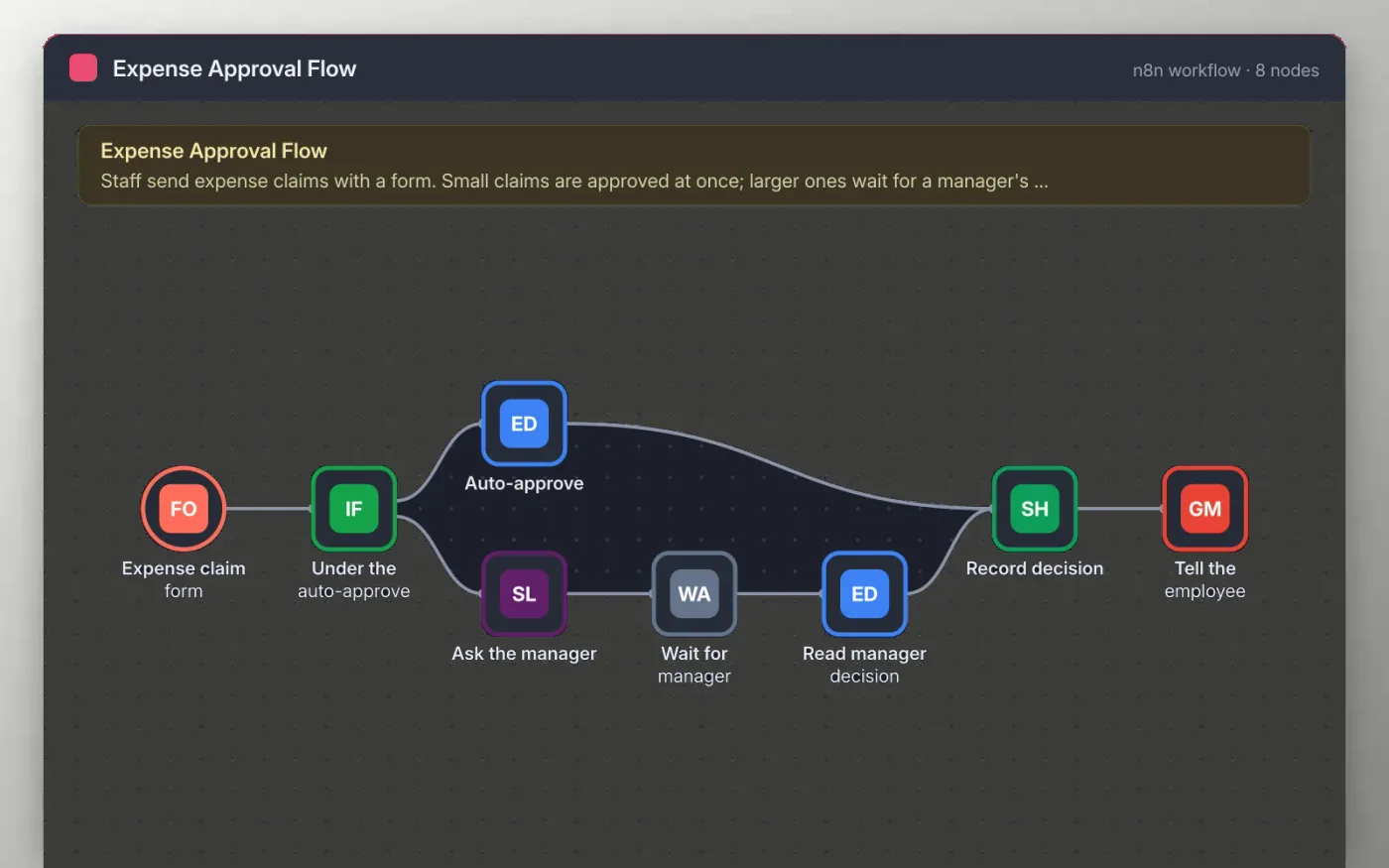
Staff send an expense claim through an n8n form with the amount, category and a receipt link. Claims under your limit are approved straight away and recorded in a sheet.
Larger claims are posted to a Slack channel with Approve and Decline links. The workflow waits for the manager to click one, then records the decision and emails the employee the result. The limit and channels are yours to set.
Download the workflow JSON.
In n8n, choose Import from File and select the JSON.
Set your auto-approve limit and connect Slack, Google Sheets and Gmail on the nodes the sticky note names.
Submit a test claim above and below the limit from the Expense claim form.
Activate the workflow and share the form link with your team.
Yes. Download the JSON and import it into your own n8n. There is no sign-up and no cost for the template.
No. The file has no keys or tokens. You connect your own Slack, Google and Gmail accounts after importing.
Yes. Add a text field to the Slack message and read it in the Read manager decision node, then add it to the sheet.
Docs + Word6 pages
Free
Excel
Free
Sheets + Excel4 slides
Free
n8n
Free
n8n
Free
n8n
Free
n8n
Free
n8n
Free







