
Annual Report
Docs + Word6 pages
Free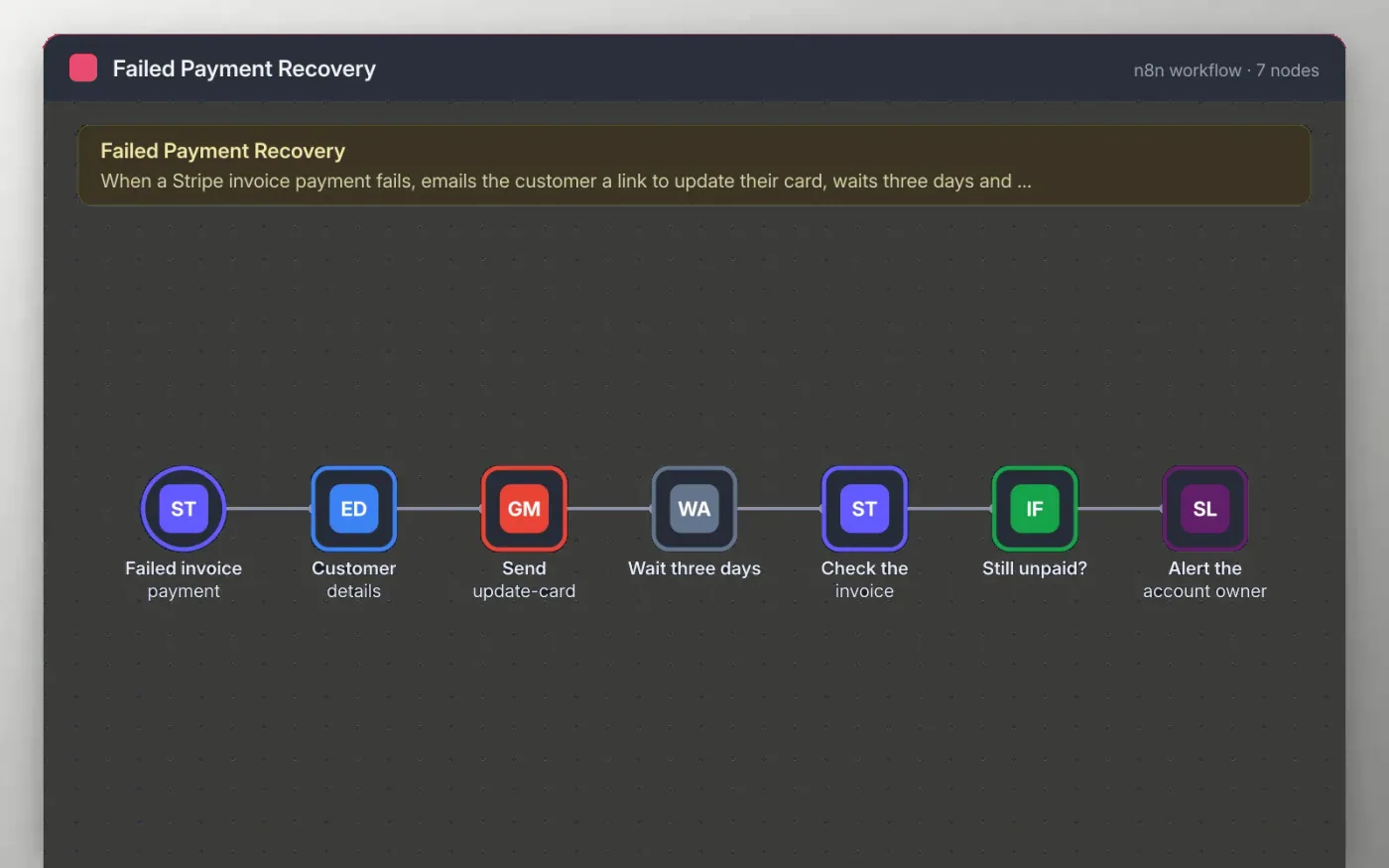
When Stripe reports a failed invoice payment, this workflow takes the customer email and the hosted invoice link, then sends a short, friendly note asking them to update their card.
After three days the workflow checks the invoice again. If it is still not paid, your team gets a Slack alert with the invoice ID and customer email. Paid invoices stop there, so nobody is chased twice.
Download the workflow JSON.
In n8n, choose Import from File and select the JSON.
Connect Stripe, Gmail and Slack on the nodes the sticky note names.
Trigger a failed payment in Stripe test mode and check the email.
Activate the workflow and point the Stripe webhook at its production URL.
Yes. Download the JSON and import it into your own n8n. There is no sign-up and no cost for the template.
No. The file has no keys or tokens. You connect your own Stripe, Gmail and Slack accounts after importing.
Yes. Open the Wait three days node and change the amount to any number of days.
Docs + Word6 pages
Free
Excel
Free
Sheets + Excel4 slides
Free
n8n
Free
n8n
Free
n8n
Free
n8n
Free
n8n
Free







