
Company Magazine
Docs + Word7 pages
Free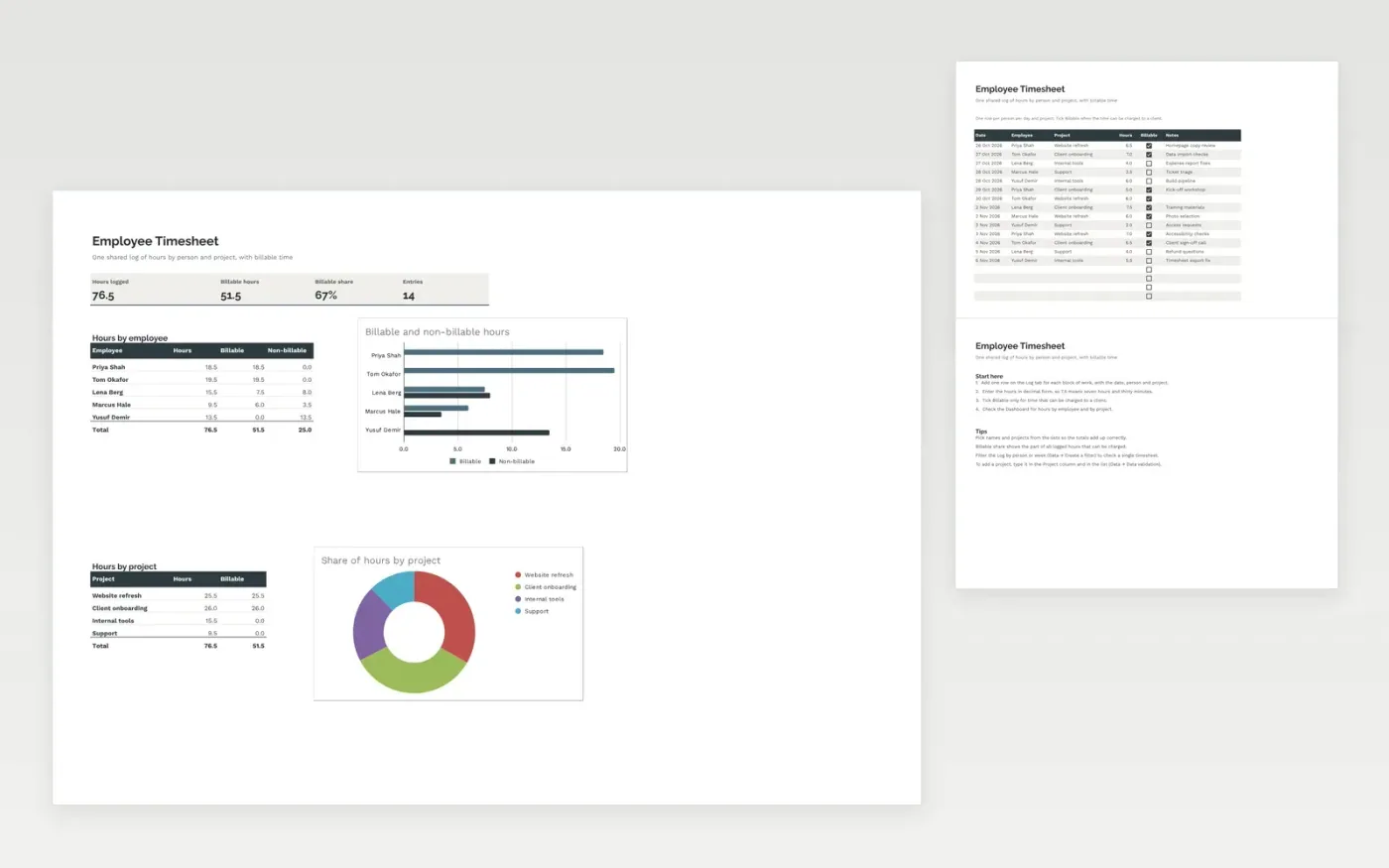
The Employee Timesheet is a shared log for a team. Each row records the date, the person, the project, the hours and whether the time is billable, with an optional note. The Dashboard totals hours overall, the billable share, and the hours for each employee and each project.
It comes with sample data for two weeks of work across four projects. Make a copy and replace the sample rows. The formulas, dropdowns, tick boxes and charts update on their own.
Click Make a copy in Google Sheets, then confirm on the Google page. The copy is saved to your own Google Drive.
Start on the Log tab: replace the sample rows with your own.
Keep the formula columns as they are; they fill in as you type.
Read the How to use tab for tips. For Excel, download the .xlsx file instead.
Yes. Make a copy in Google Sheets or download the .xlsx file for Excel. There is no charge for the template.
Yes. Download the .xlsx file and open it in Excel. The formulas, dropdowns, tick boxes and charts work there as well as in Google Sheets.
Billable share is the hours marked Billable divided by all logged hours. It shows the part of the team's time that can be charged to clients.
Docs + Word7 pages
Free
Docs + Word21 pages
Free
Slides + PowerPoint16 slides
Free
Sheets + Excel3 slides
Free
Sheets + Excel3 slides
Free








