
Annual Report
Docs + Word6 pages
Free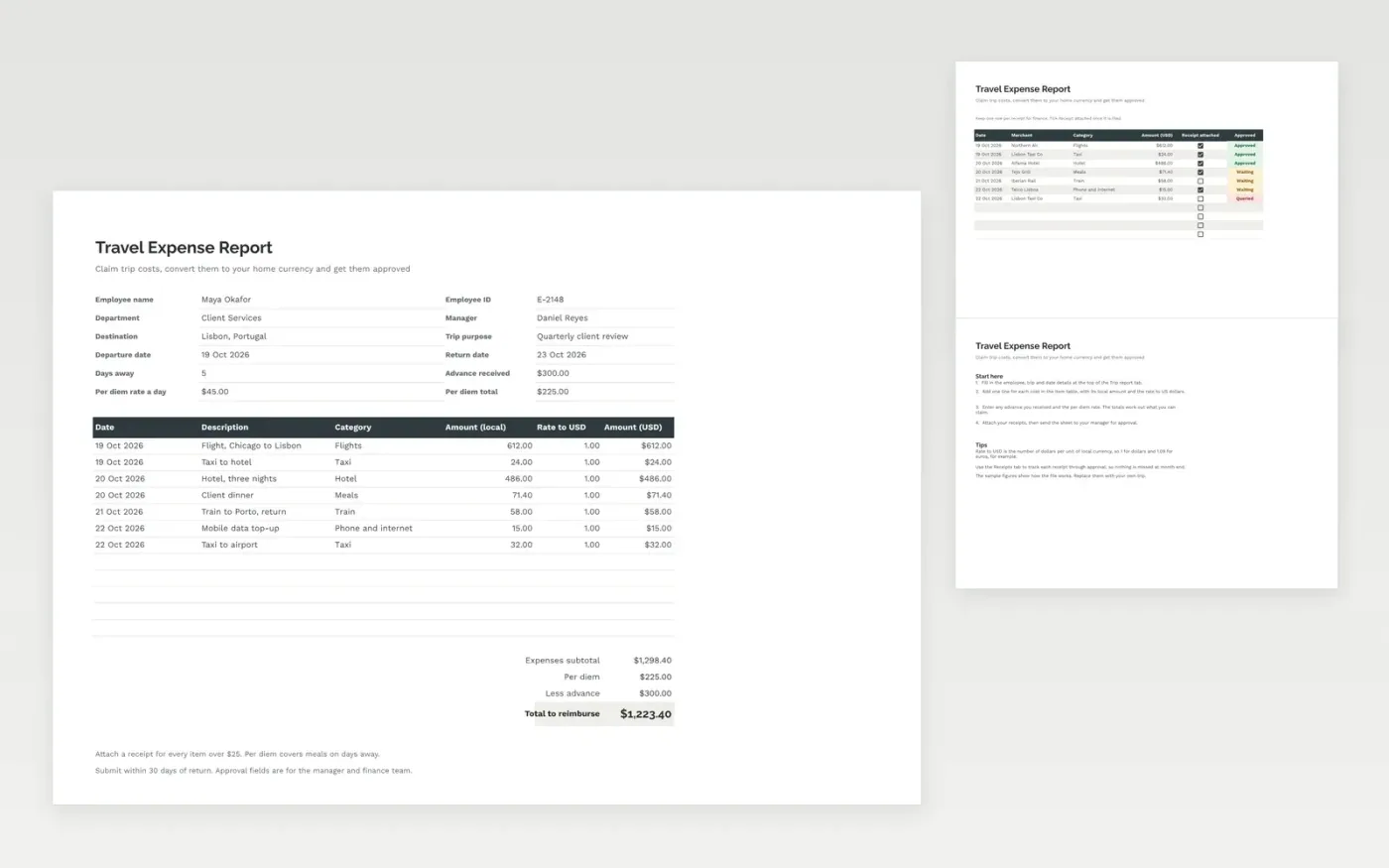
The Travel Expense Report template is a form for claiming the cost of a business trip. The Trip report tab holds the employee and trip details, each cost with its local amount and exchange rate, the per diem and any advance, and the total to reimburse. The Receipts tab tracks each receipt through approval.
It comes with sample data. Make a copy, replace the sample rows with your own, and the formulas and dropdowns update on their own.
Click Make a copy in Google Sheets, then confirm on the Google page. The copy is saved to your own Google Drive.
Start on the Trip report tab: replace the sample rows with your own.
Keep the formula columns as they are; they fill in as you type.
Read the How to use tab for tips. For Excel, download the .xlsx file instead.
Yes. The template is free to copy. Make a copy in Google Sheets, or download the Excel file and use it as you like.
Yes. Download the .xlsx file from this page and open it in Excel. The form, formulas and dropdowns work the same way as in Google Sheets.
Enter the rate to US dollars for each item. The USD amount is the local amount multiplied by that rate, rounded to the nearest cent.
Docs + Word6 pages
Free
Excel
Free
Sheets + Excel4 slides
Free
Sheets + Excel3 slides
Free
Sheets + Excel3 slides
Free
Sheets + Excel3 slides
Free







