
Annual Report
Docs + Word6 pages
Free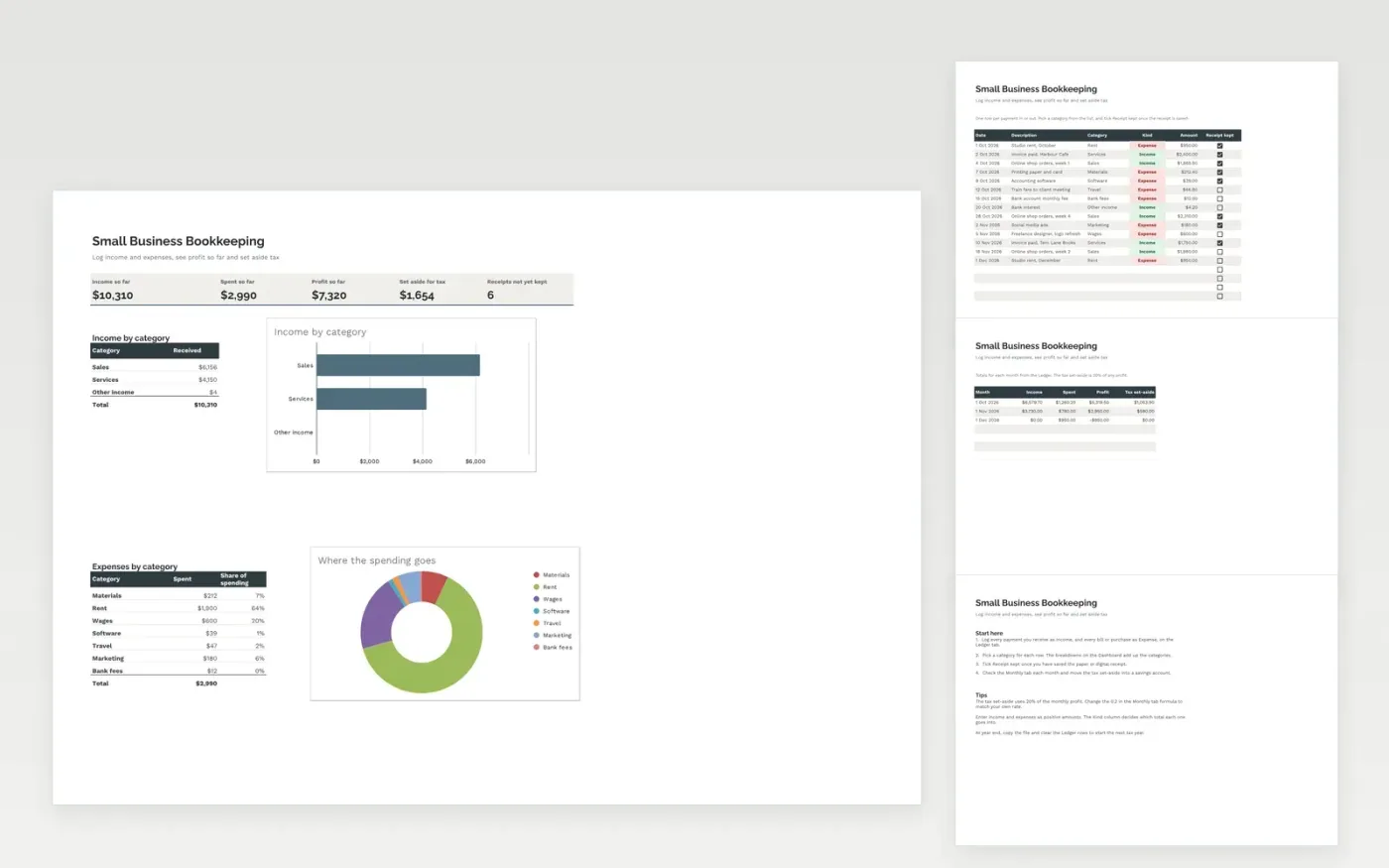
A simple bookkeeping ledger for a small business or sole trader. The Ledger tab records every payment in and out, with a category and a receipt check. The Monthly tab totals income, spending and profit for each month and works out a tax set-aside, and the Dashboard shows the year so far by category.
It comes with sample data for a small studio. Make a copy and replace the sample rows. The category totals, monthly summary and charts update on their own.
Click Make a copy in Google Sheets, then confirm on the Google page. The copy is saved to your own Google Drive.
Start on the Ledger tab: replace the sample rows with your own.
Keep the formula columns as they are; they fill in as you type.
Read the How to use tab for tips. For Excel, download the .xlsx file instead.
Yes. Download the template and use it at no cost to keep your own records.
Yes. Download the .xlsx file and open it in Excel. The formulas, dropdowns and charts all work there.
Yes. The Monthly tab sets aside 20% of monthly profit. Change the 0.2 in that formula to your own rate, or ask an accountant what applies to you.
Docs + Word6 pages
Free
Excel
Free
Sheets + Excel4 slides
Free
Sheets + Excel4 slides
Free
Sheets + Excel5 slides
Free







