Leave of Absence Request Letter
Docs + Word3 pages
Free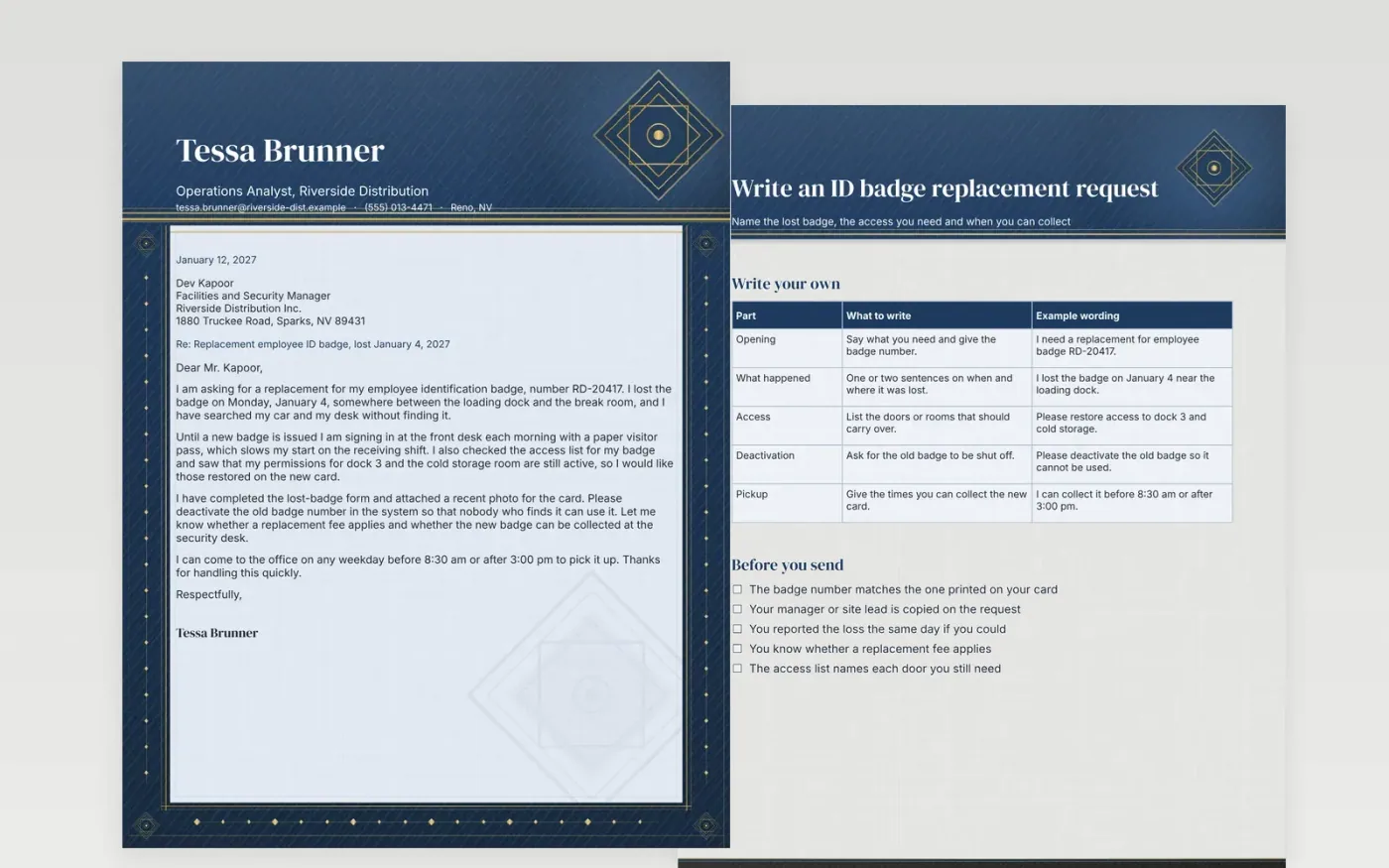
A lost or damaged staff badge leaves someone locked out of the rooms they need, so this request goes to the desk that issues cards without delay. It opens with the badge number and the day the card went missing, which lets the desk find the record in seconds. Next come the doors that must carry over onto the new card, and a request to switch off the old one.
Once the letter arrives, the reader can check the badge history, print the replacement and set the door permissions in one visit. Before sending, confirm the number on the card, copy your manager and note any fee, so the pickup is a simple exchange at the front desk.
Make a copy in Google Docs, or download the Word file.
Type over the sample text with your own details.
Delete the guide page when you are done.
Print it, or save it as a PDF.
Send it to the facilities or security desk that issues badges, and copy your manager so the request is approved.
Many sites require a report before a new card is issued. Check your handbook, and if there is a lost-badge form, complete it and attach it.
Yes. Naming the doors you still need helps the new badge get set up correctly the first time.
More Google Docs templatesMore business operations templates
Docs + Word3 pages
Free
Docs + Word3 pages
Free
Docs + Word3 pages
Free
Docs + Word2 pages
Free
Docs + Word2 pages
Free
Docs + Word2 pages
Free
Docs + Word2 pages
Free
Docs + Word2 pages
Free
Docs + Word2 pages
Free
Docs + Word2 pages
Free
Docs + Word2 pages
Free
Docs + Word2 pages
Free
Docs + Word2 pages
Free
Docs + Word2 pages
Free
Docs + Word2 pages
Free










