Class Attendance Sheet
Sheets + Excel4 slides
Free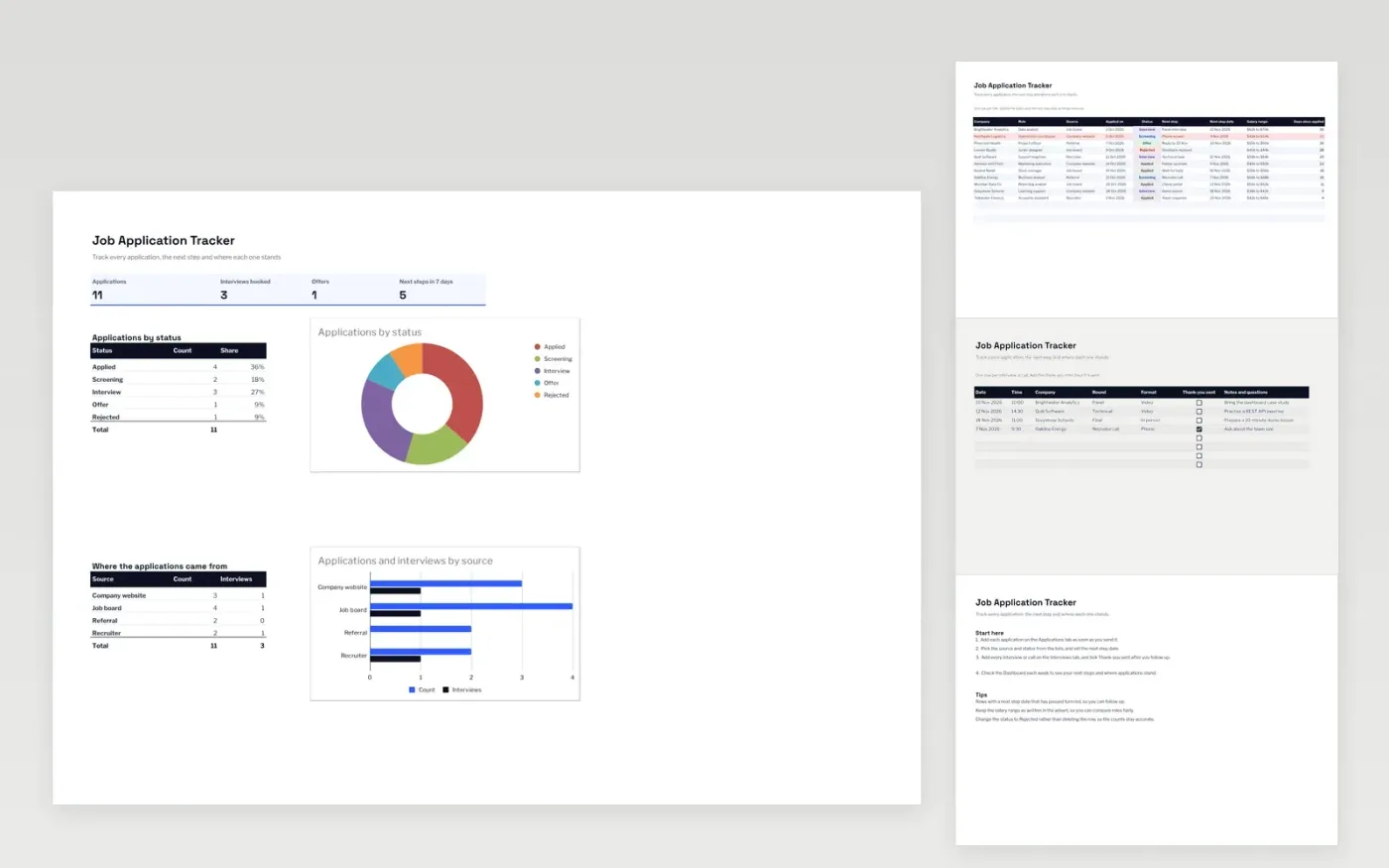
The Job Application Tracker keeps every application in one place. The Applications tab records the company, role, source, status, salary range and the next step with its date. The Interviews tab logs each call or interview, its format and whether you have sent a thank-you note.
The Dashboard counts applications by status and by source, and shows how many next steps fall due in the coming week. It comes with sample data for ten roles. Make a copy, replace the sample rows and keep the statuses up to date. Counts, dropdowns and the highlight for overdue steps update on their own.
Click Make a copy in Google Sheets, then confirm on the Google page. The copy is saved to your own Google Drive.
Start on the Applications tab: replace the sample rows with your own.
Keep the formula columns as they are; they fill in as you type.
Read the How to use tab for tips. For Excel, download the .xlsx file instead.
Yes. Download the template and use it at no cost. There is nothing to sign up for.
Yes. Download the .xlsx file and open it in Microsoft Excel. The dropdowns, counts and highlights all work there.
A row turns red when its next step date has passed and the status is not Rejected or Offer. It is a reminder to follow up or update the row.
Sheets + Excel4 slides
Free
Sheets + Excel4 slides
Free
Sheets + Excel5 slides
Free