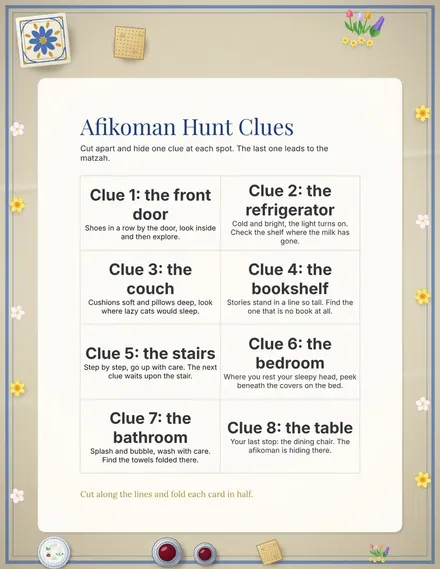
Afikomen Hunt Clue Cards
Docs + Word1 page
Free
Judging a hat parade is easy until the ballots come back with scribbles in the margins. This tally gives every judge the same three questions: style, creativity and fit with the party theme, each scored from 1 to 10. You enter one row per judge and hat on the Ballots tab, using the same spelling for each entry so the sheet can group them.
The Categories tab counts the ballots for each hat, averages the three scores, adds them into a total and ranks the field. The Winners tab then names the best overall hat, the runner up and the leader in each category, along with the person wearing it. Ties are broken by the order of the list, so the prize ceremony never stalls on a second count.
Click Make a copy in Google Sheets, then confirm on the Google page. The copy is saved to your own Google Drive.
Start on the Ballots tab: replace the sample rows with your own.
Keep the formula columns as they are; they fill in as you type.
Read the How to use tab for tips. For Excel, download the .xlsx file instead.
Give each judge a ballot with style, creativity and theme fit, each from 1 to 10. Add them to the Ballots tab and the sheet averages and ranks the hats.
Yes. Add one row per judge and hat on the Ballots tab. The category averages count every ballot for that hat.
The hat listed first on the Categories tab ranks higher. Reorder the list or add a tie-break round if you want a different rule.
Docs + Word1 page
Free
Docs + Word2 pages
Free
Docs + Word1 page
Free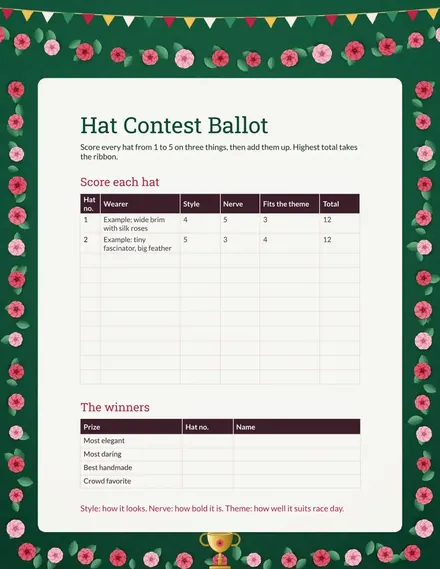
Docs + Word1 page
Free
Docs + Word1 page
Free
Sheets + Excel6 tabs
Free
Docs + Word1 page
Free
Docs + Word1 page
Free
Sheets + Excel5 tabs
Free
Docs + Word1 page
Free
Docs + Word1 page
Free
Docs + Word1 page
Free
Docs + Word1 page
Free
Sheets + Excel5 tabs
Free
Docs + Word1 page
Free