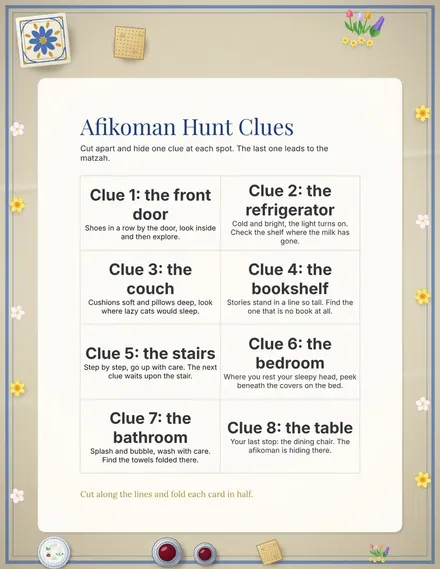
Afikomen Hunt Clue Cards
Docs + Word1 page
Free
Your league site shows a score, but not why a running back with 96 yards and a touchdown beat your quarterback. Here the Scoring tab lists the points for each stat, and the Stats tab turns a stat line into points the instant you type it. Switch from half to full point per reception, or double the value of a passing touchdown, and all of the points move together.
Team Points adds up the players you assign to each fantasy team and ranks them. The Summary shows the highest scorer, the average, and the total by position, so you can see which positions carried the week. It is a sandbox for settling scoring debates and for leagues that score their own games by hand.
Click Make a copy in Google Sheets, then confirm on the Google page. The copy is saved to your own Google Drive.
Start on the Scoring tab: replace the sample rows with your own.
Keep the formula columns as they are; they fill in as you type.
Read the How to use tab for tips. For Excel, download the .xlsx file instead.
Each stat is multiplied by its value on the Scoring tab and the results are added. One point per 25 passing yards is entered as 0.04.
Yes. Change the points for Reception on the Scoring tab from 1 to 0.5 and every player's total updates.
Not in this version. It scores passers, runners, pass catchers and tight ends, the spots behind most scoring debates.
Docs + Word1 page
Free
Docs + Word2 pages
Free
Docs + Word1 page
Free
Sheets + Excel17 tabs
Free
Sheets + Excel6 tabs
Free
Sheets + Excel7 tabs
Free
Docs + Word1 page
Free
Sheets + Excel8 tabs
Free
Docs + Word1 page
Free
Docs + Word1 page
Free
Docs + Word1 page
Free
Docs + Word1 page
Free
Sheets + Excel8 tabs
Free
Docs + Word1 page
Free
Sheets + Excel7 tabs
Free